


Download Yamb – Free Video & Audio Extraction Tool for Windows
Overview
Yamb is a lightweight, free Windows utility that lets you extract video and audio streams from virtually any multimedia file. Since its first appearance in our catalog in 2007, Yamb has amassed more than 155,000 installations worldwide, with a steady flow of new users every week. Designed for Windows 98 and later, the program occupies a fraction of the storage space required by most video‑editing suites, making it an ideal choice for users who need a quick, secure way to pull out soundtracks or video clips without the overhead of a full‑featured editor.
Its simple English interface, combined with a single‑click extraction process, means even beginners can start ripping media immediately after download. Yamb is especially popular in regions such as Serbia, Bosnia and Herzegovina, and India, where reliable, low‑resource software is highly valued. The current stable release, version 1.6, was last updated on March 28, 2007, but the core extraction engine remains robust and compatible with modern container formats like MP4, MKV, AVI, and FLV.
Whether you need to isolate a podcast’s audio track, salvage a video clip from a corrupted file, or simply create a separate soundtrack for a presentation, Yamb delivers a fast, secure, and completely free solution.
Key Features
- One‑Click Extraction: Pull audio or video streams from supported files with a single mouse click.
- Broad Format Support: Handles MP4, MKV, AVI, FLV, WMV, MOV, and many other container formats.
- Low Disk Footprint: The installer is under 2 MB, and the program runs with minimal RAM usage.
- Batch Processing: Queue multiple files for simultaneous extraction, saving time on large projects.
- Preserves Original Quality: Extracted streams are saved without re‑encoding, ensuring no loss in fidelity.
- Command‑Line Interface (CLI): Advanced users can script extractions for automation.
- Portable Version: No installation required; run directly from a USB stick on any compatible Windows PC.
- Secure & Ad‑Free: Free of bundled software, spyware, or unwanted advertisements.
- Multilingual Support (English): Clear menus and tooltips guide users through each step.
Installation, Usage & Compatibility
Installation Steps
- Download the Yamb installer from the official link provided below.
- Locate the
.exefile in your Downloads folder and double‑click to launch the wizard. - Accept the license agreement, then choose the destination folder (default is
C:\Program Files\Yamb). - Click Install. The process takes less than a minute due to the program’s tiny size.
- Once installation finishes, you can launch Yamb from the Start menu or a desktop shortcut.
How to Extract Media
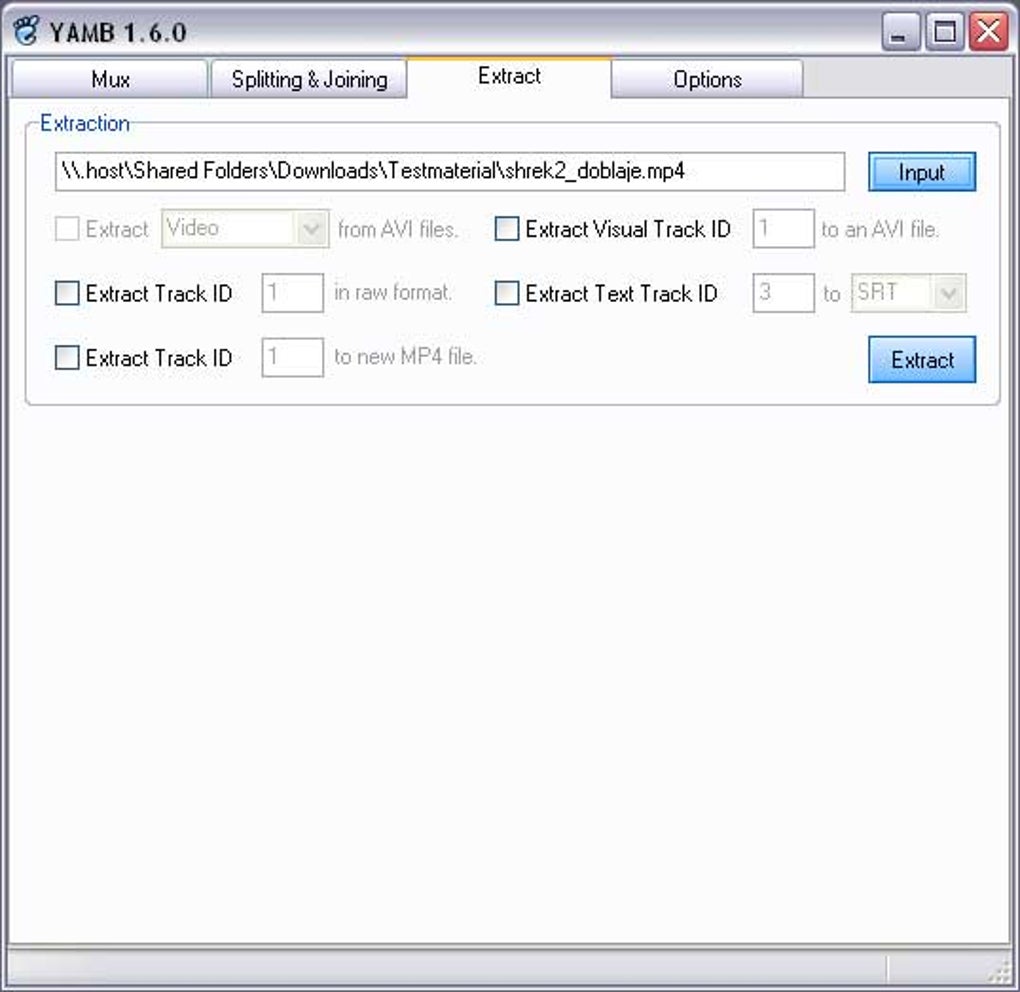
After launching Yamb, you’ll see a clean window with three main sections: Source File, Output Destination, and Action Buttons. To extract audio, click Browse next to the Source File, locate your video, and then select Extract Audio. Choose a folder for the output, and Yamb will save the audio track in its original format (typically AAC, MP3, or AC3). For video extraction, the process is identical—just click Extract Video instead. If you need to process several files, use the Add to Queue button, then click Start Queue to begin batch extraction.
System Requirements & Compatibility
Yamb runs on Windows 98, Windows ME, Windows 2000, Windows XP, Windows Vista, Windows 7, and later versions up to Windows 10/11 (32‑bit and 64‑bit). The software does not require .NET Framework or additional codecs, as it uses its own built‑in extraction engine. Minimum requirements are modest: 64 MB RAM, 50 MB of free disk space, and a Pentium III‑class processor. Because Yamb is a portable tool, you can also run the Yamb.exe directly from a USB flash drive on any compatible Windows PC without performing a traditional installation.
Pros, Cons, FAQ & Conclusion
Pros & Cons
- Pros:
- Free and completely ad‑free.
- Extremely low system requirements.
- One‑click operation makes it accessible to beginners.
- Supports batch processing for efficiency.
- Preserves original media quality – no re‑encoding.
- Cons:
- Interface looks dated compared with modern tools.
- No built‑in video editing capabilities (only extraction).
- Last official update was in 2007; occasional compatibility quirks with very new codecs.
- Lacks native support for macOS, Linux, Android, or iOS.
Frequently Asked Questions
Is Yamb safe to download and use?
Yes. Yamb is distributed as a free, ad‑free executable from reputable sources. It does not contain spyware, malware, or unwanted bundled software.
Can Yamb extract audio from DRM‑protected files?
No. Yamb respects digital rights management. It can only extract streams from files that are not protected by DRM.
What output formats does Yamb support for extracted audio?
Yamb saves the audio in its original codec—commonly MP3, AAC, AC3, or WAV—without conversion, preserving the source quality.
Is there a portable version that can run from a USB drive?
Yes. Yamb offers a portable zip package that contains only the executable and required libraries. Simply unzip to a USB stick and run Yamb.exe on any compatible Windows PC.
How does Yamb handle batch extraction?
You can add multiple files to the queue using the Add to Queue button. Once the queue is populated, click Start Queue and Yamb will process each file sequentially, saving the results to the designated output folder.
Conclusion & Call to Action
Yamb remains a solid choice for anyone who needs a quick, free solution to extract audio or video streams from multimedia files on Windows. Its minimal footprint, straightforward interface, and lossless extraction make it especially appealing for students, hobbyists, and professionals who work on low‑spec machines or require a portable tool. While the UI may feel nostalgic and the lack of recent updates could be a concern for the very latest codecs, the core functionality is still reliable and widely used in regions where lightweight software is essential. If you’re looking for a secure, ad‑free extractor that won’t hog system resources, give Yamb a try today. Download Yamb now and start pulling the exact media you need in seconds.







